Agency Find & sign clients
Find prospects
A trade and a town: Clama brings back the businesses poorly placed on Google Maps, with what's wrong and a ready message.
In short: in Find clients, Clama searches Google Maps for businesses of one trade in one town, and shows you the ones to help, those that need it most first. They then land in Your prospects, with a demo and a message ready. 1 credit per search.
Run a search
- Open Tools › Find clients › Prospects (or the day 3 mission in My progress).
- In the Local businesses that are hard to find on Google Maps card, tap Find businesses to help. Clama opens.
- Fill in Trade (for example hairdresser) and Town or neighbourhood.
- Tap Find businesses to help · 1 credit. The search takes about 20 seconds.
- For each business you see what's wrong: No website, Few reviews, Listing not claimed, Few photos…
- See the mini-audit for the proof, Copy the message for the first contact, Prepare a demo to come back to your account and go further.
Your prospects
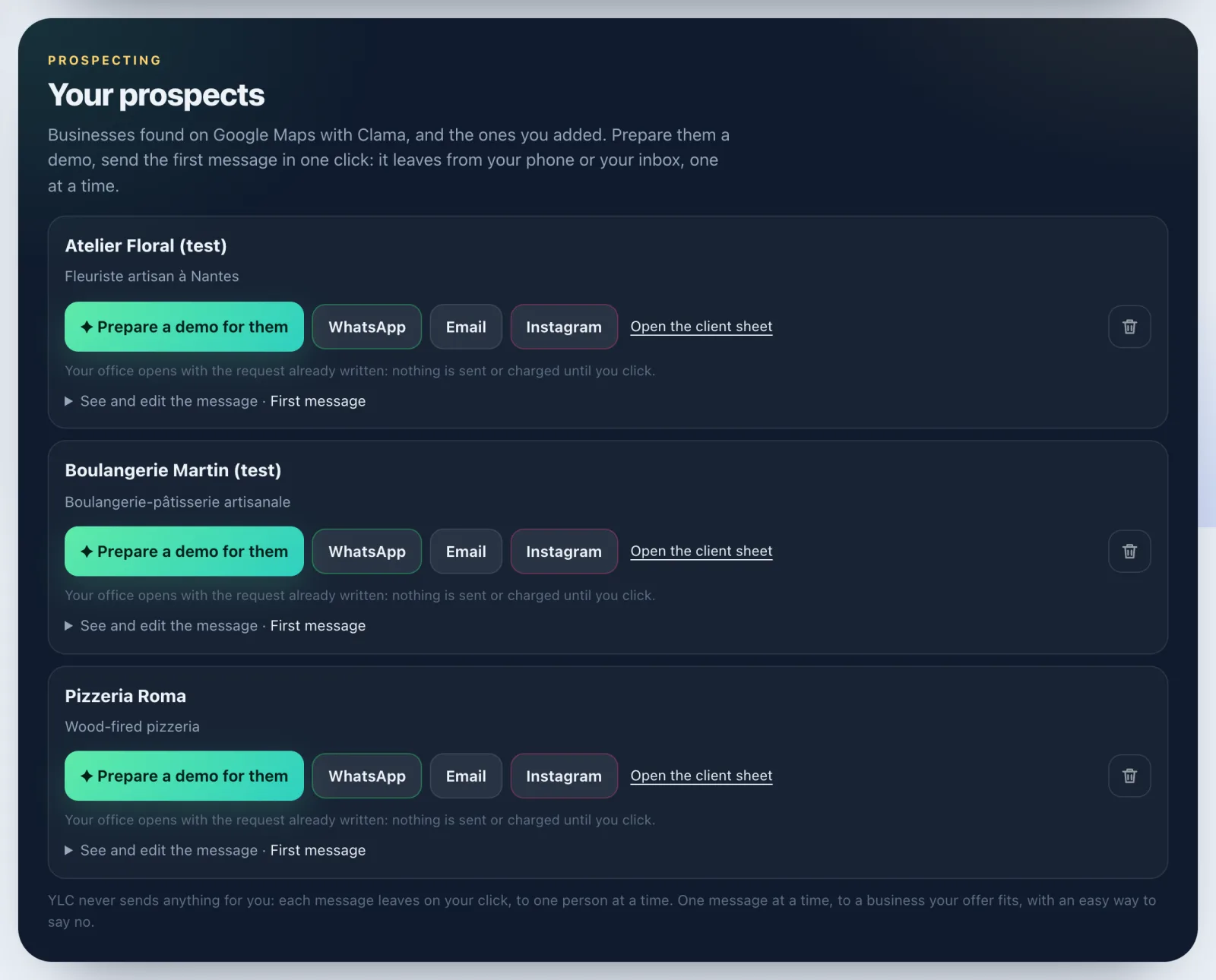
Back on the page, Your prospects gathers the businesses found with Clama and the clients you added who are still at the start. For each one:
- Prepare a demo for them: your office opens with the request already written;
- Contact them: the message is ready, in their name and about what they're missing. Pick WhatsApp, Email or Instagram, read it (See and edit the message), and send it yourself;
- Open the client sheet, or Delete if you're no longer interested.
The Follow up tag tells you who to follow up today. Empty list? Tap Add a practice client to try things out without sending anything to anyone.
Further down, Your showcase, in your bio gives you your Straby page link to paste in your bio.
For messages by channel (DM, email, call, follow-ups), go to Scripts: see Your prospecting scripts.
What it costs
1 credit per Clama search, given back if nothing is found. Messages, follow-ups and scripts are free. A demo has its own price, shown before you confirm.
If it doesn't work
- "Fill in the trade and the town (2 letters at least)."
- "No business found for this search": try a more common trade or a nearby town. Your credit was given back.
- "Google Maps didn't answer this time": your credit was given back, try again in a minute.
- The Clama card button is greyed out with "Coming soon": the search isn't open yet, come back later.
- "This prospect no longer exists (Clama searches last 30 days)."
- "A project is already running on your account": finish or cancel it before preparing another demo.
- "Add their phone or email under "Contact" on their sheet": the send buttons need it.
See also
Did this article help you?
Thanks! Glad it helped.
Sorry about that. Write to us: a person from the team will answer. Write to us