Agency Find & sign clients
Your agency showcase
Your agency page on Straby, in three guided steps: your brand, what you offer, how to reach you.
In short: your showcase is your agency's page on Straby: your services, your prices and a big button to contact you. It's the link you'll send with your demos. Allow about 5 minutes.
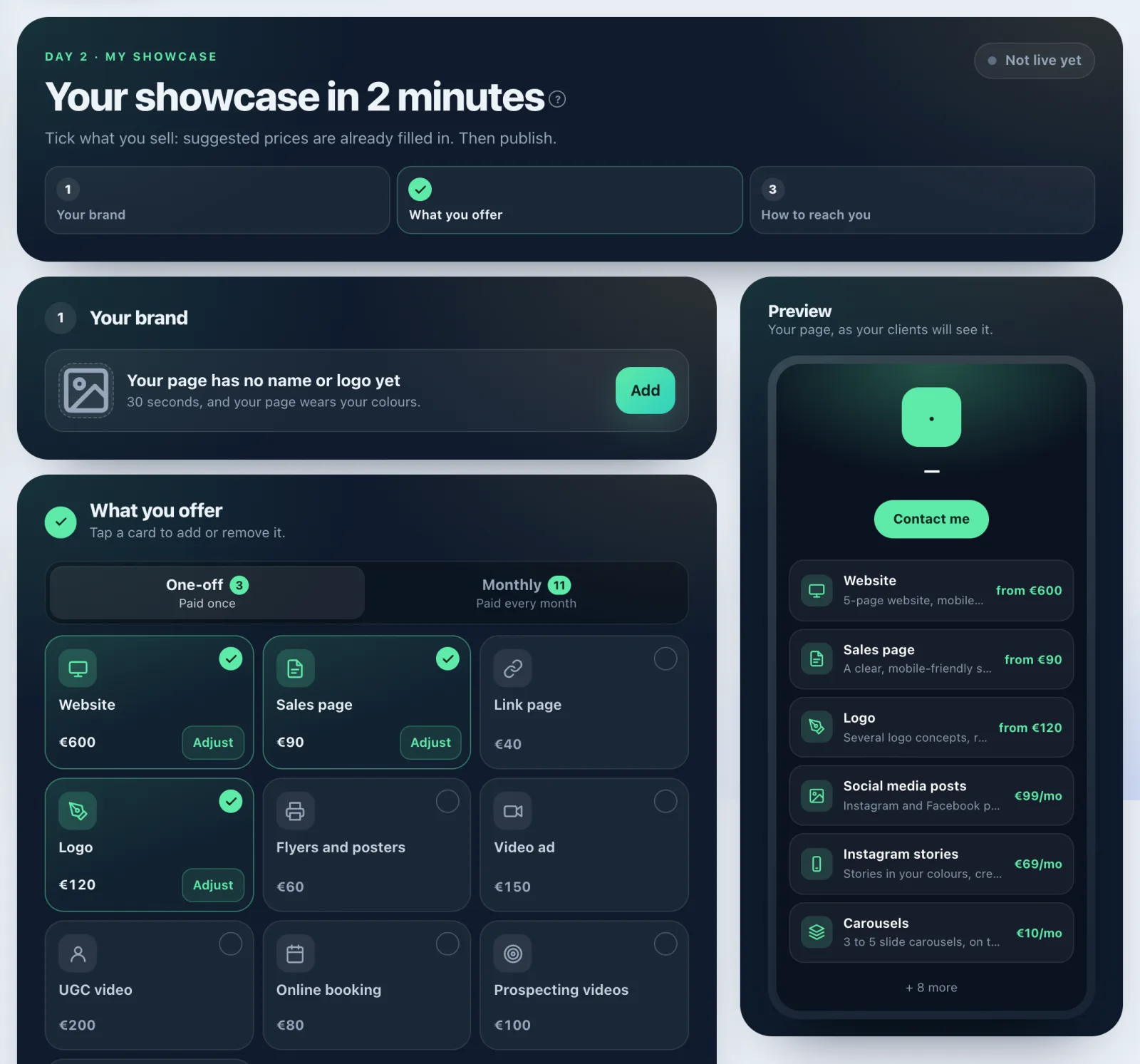
Build your showcase
- Open Tools › My agency › My showcase.
- Your brand: if your page has no name or logo yet, tap Add (otherwise Edit). You land on your agency's brand: free express logo, colours, contact details.
- What you offer: tap a card to add or remove it. Suggested prices are already filled in. One-off is paid once, Monthly is paid every month. Tap Adjust to change your starting price, what's included and the turnaround.
- How to reach you: one is enough (booking link, WhatsApp or email). It's the big button on your page.
- Look at the Preview, then tap Publish my showcase.
After publishing
- Copy link to put it in your bio or send it with a demo. View my page opens it.
- Each change goes live with Update my showcase.
- More options: packages, setup fee, promo codes, terms of sale and your work.
- Get paid on your page: connect your Whop account so clients can buy from you in one click. You can do this later.
What it costs
Building and publishing your showcase costs no credits. My showcase is part of the Agency Pass.
This is also where you change your prices: the old My prices address takes you straight to the What you offer step.
If it doesn't work
- "Add at least one one-off service: that's what completes your mission.": tick at least one One-off card.
- Changes not published yet: tap Update my showcase.
- "That didn't work. Try again in a moment.": try again.
See also
Did this article help you?
Thanks! Glad it helped.
Sorry about that. Write to us: a person from the team will answer. Write to us