Account & privacy
Your settings
Your photo, first name and username, language, connections, emails, signing out everywhere and deleting your account.
On this page
In short: Settings gathers everything about your account in five groups: Profile, Language, Connections, Emails and Account and security. At the top, one pill per group takes you there.
Open your settings
- Tap your avatar at the bottom of the sidebar (My account).
- Tap Settings.
Profile
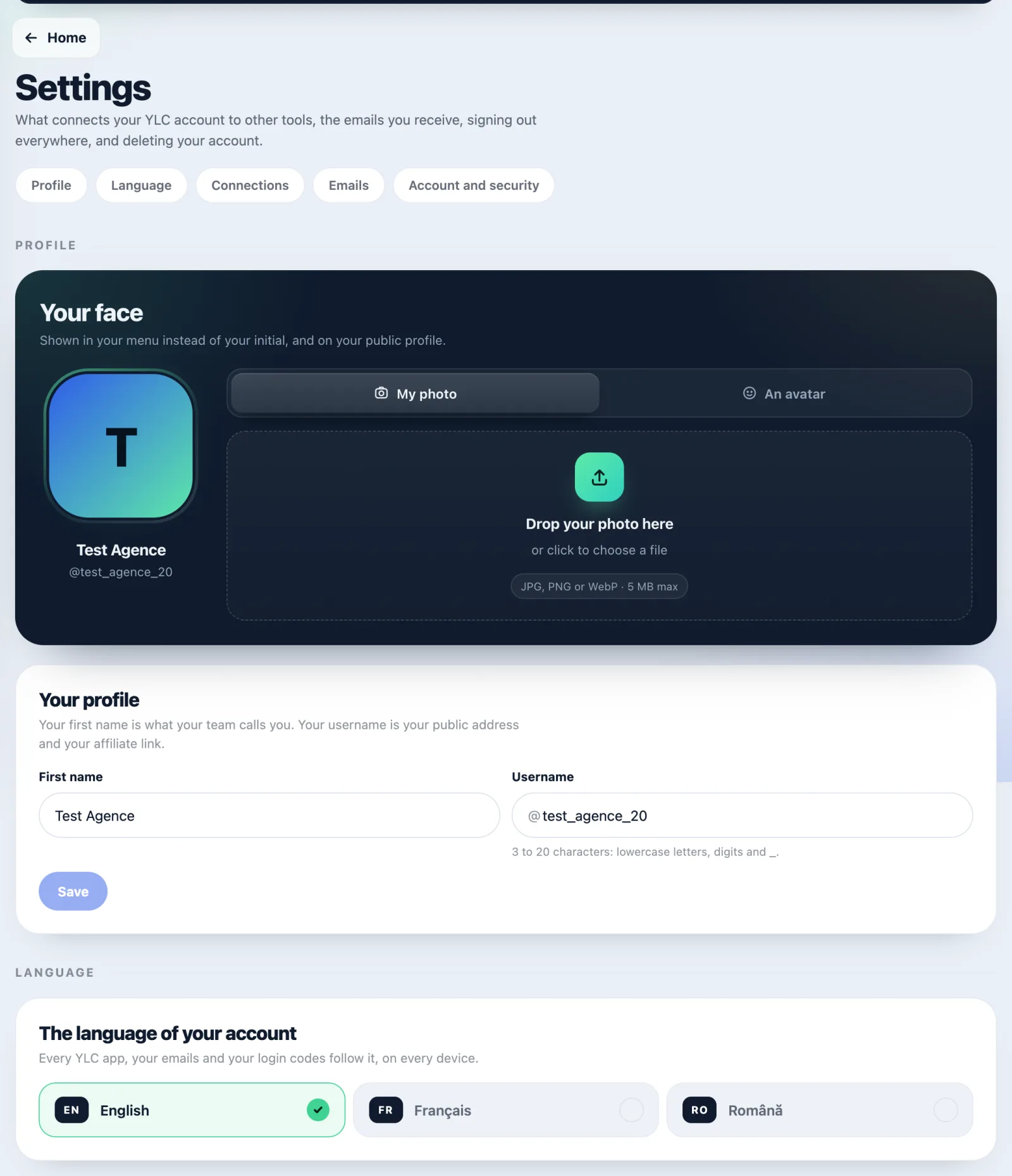
- Your face: the photo shown in your menu instead of your initial. My photo tab: drop a photo (JPG, PNG or WebP, up to 5 MB). An avatar tab: pick one of the sixteen glass sea creatures, then tap Save.
- Your profile: your First name (what your team calls you) and your Username (your public address and your affiliate link). Tap Save.
- The person who invited you (only if you came through a referral link): choose whether they see your first name, email and WhatsApp, and whether you receive their messages of encouragement.
Language
Tap English, Français or Română. Every YLC app, your emails and your sign-in codes follow this choice, on all your devices.
Connections
- AI connectors: apps like Claude or ChatGPT that you allowed. Disconnect removes their access. See Use YLC from Claude or ChatGPT.
- Your calendar: Connect or Manage. See Connect your calendar.
- Canva: Connect or Manage. See Connect Canva.
Emails
Tick or untick "Send me the onboarding tips", then tap Save. Sign-in codes, receipts and messages about your Pass always reach you.
Account and security
- Security: Sign out of every app closes your YLC account on every site and every device. Useful if you lost a phone.
- Your data: Your data, in short, Privacy policy, Terms and Delete my data.
- Delete my account: see Delete your account.
What it costs
Nothing. Your settings cost no credits.
If it doesn't work
- "That username is taken. Try another one.": choose another username.
- "3 to 20 characters: lowercase letters, digits and _ only.": no spaces, no capitals, no accents.
- "5 MB at most." or "JPEG, PNG or WebP only.": use another photo.
- "That didn't save. Try again in a moment.": try again.
- You don't see the calendar or Canva: these connections aren't open yet.
See also
Did this article help you?
Thanks! Glad it helped.
Sorry about that. Write to us: a person from the team will answer. Write to us