Getting started
Switch space
Move from My business to My agency (or back) in one click, with the Your space selector at the top of the sidebar.
In short: at the top of the sidebar, tap your business or agency name, then choose My business or My agency. You land in your office, in the new space.
Switch space on a computer
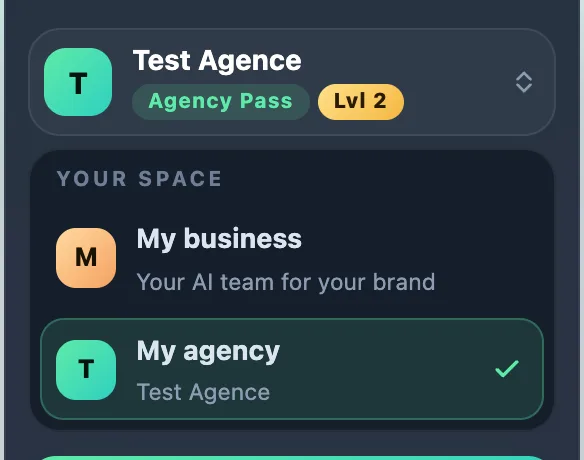
- At the top of the left sidebar, tap the card with your name and your Pass (its tooltip says "Switch space").
- The Your space list opens: My business ("Your AI team for your brand") and My agency ("Your AI team for your clients").
- Tap the space you want. The tick shows the open space.
Switch space on a phone
- Tap Menu to open the sidebar.
- Tap the card with your name, at the top.
- Choose My business or My agency.
What changes
- My office works for your brand (My business) or for your clients (My agency).
- The tools in the sidebar change: Clients, Find clients, My agency and My progress only exist in My agency.
- What your team made stays: switching space deletes nothing.
Your choice is saved on your account: you find it on all your devices.
If it doesn't work
- My agency has a padlock: your Pass is the Business Pass. Tapping My agency opens the Upgrade to the Agency Pass page. See My business or My agency.
- Nothing changes after your click: reload the page. If you are signed out, sign in again and retry.
See also
Did this article help you?
Thanks! Glad it helped.
Sorry about that. Write to us: a person from the team will answer. Write to us