Getting started
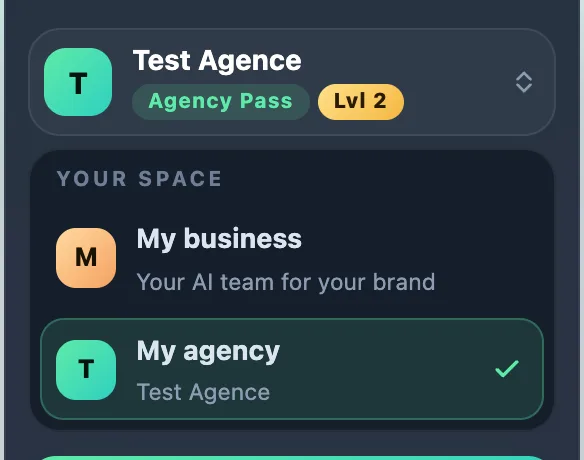
My business or My agency
YLC has two spaces: your AI team works for your own brand, or for your agency's clients. Here is what each Pass opens.
On this page
In short: in My business, your team works for your brand. In My agency, it works for your clients. The Business Pass opens the first space, the Agency Pass and the Founder Pack open both.
My business
Your team works for your own brand: your logo, website, posts, videos, Google reviews and booking page. Your brand lives in My brand, and the whole team follows it.
In the sidebar you find My office, History, Referrals and, under Tools, My brand and Studio.
My agency
Your team works for your clients, and what you deliver carries your agency's brand. Under Tools you also find Clients (your clients, quotes, your clients' subscriptions, payments), Find clients (prospects, scripts), My agency (your showcase, agency brand, offer and guides) and My progress (your 7-day Challenge and trophies).
Which Pass opens what
- Business Pass (€59 excl. VAT a month, 150 AI credits a month): the My business space. In the selector, My agency has a padlock and the words "With the Agency Pass".
- Agency Pass (€119 excl. VAT a month, 400 AI credits a month) and Founder Pack: both spaces. Switch from one to the other in one click.
- Referrals are open in both spaces.
When you arrive
Your office asks you one question: is your AI team For my business or To start an agency? This choice isn't final: it only sets where you start (your business quests, or the 7-day Challenge).
Moving from the Business Pass to the Agency Pass
- In the Your space selector, tap My agency (with its padlock).
- The Upgrade to the Agency Pass page compares the two Passes in a table, line by line. Your current Pass is marked Your Pass.
- Tap Upgrade to the Agency Pass · €119 excl. VAT/month. The change is settled on your Pass page, before you pay. Nothing is paid on this page.
- Not now? Tap Back to my office.
After payment, your account moves to the My agency space on its own. You keep everything your team already made for your brand.
If it doesn't work
- My agency sends you to the Upgrade page: your current Pass is the Business Pass, which doesn't open the Agency space.
- The Upgrade page sends you back to your office: your Pass already opens the My agency space.
- No payment button in the iPhone or Android app: nothing is bought in the app. Go to account.ylcnetwork.com in your browser.
- You don't see Clients or Find clients: you are in the My business space. Switch with the selector. See Switch space.
See also
Did this article help you?
Thanks! Glad it helped.
Sorry about that. Write to us: a person from the team will answer. Write to us