Agency Your agency
Your clients' Brain
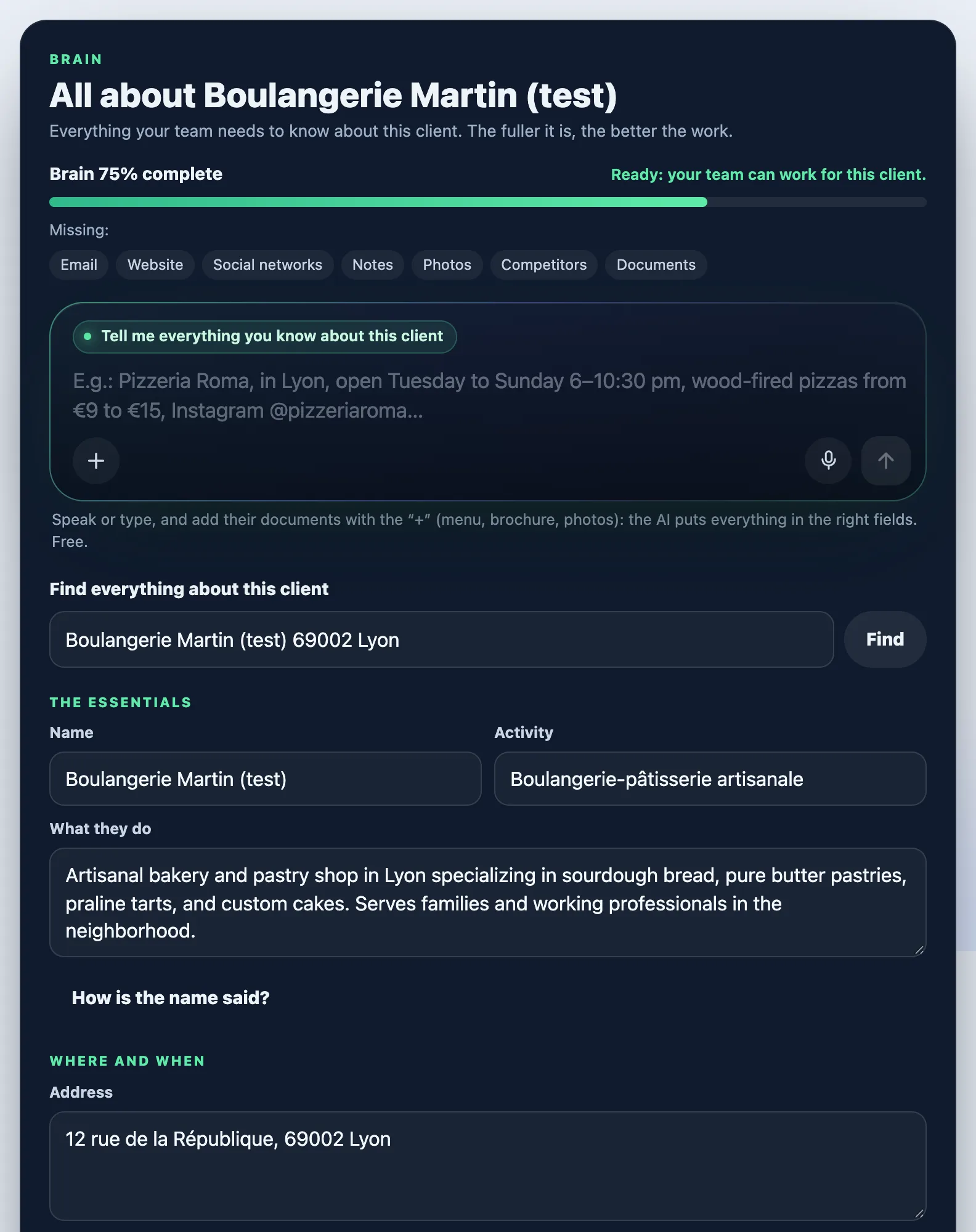
Everything your team knows about each client, and "Find everything about this client" to fill it in about twenty seconds.
On this page
In short: each client has a Brain: name, activity, opening hours, offer, tone, logo, photos… The fuller it is, the better your team's work. Fill it by talking, or with Find everything about this client (5 credits).
Open the Brain
- Open My clients, then the client's card.
- Tap Complete the Brain (or Open the Brain page).
- For a new client, you can also start from New client in Which client is this for?, above the office input.
Fill it by talking
- In Tell me everything you know about this client, speak or type: their name, town, hours, prices, social accounts…
- Add their documents with the + (menu, brochure, photos).
- Tap Sort it: the AI puts everything in the right fields. It's free.
- Check the suggested fields, then tap Save the Brain (or Create the client).
Find everything about this client
- In Find everything about this client, type their name and town, or paste a link (website, Instagram, Google Maps…).
- Tap Find: the price is shown (5 credits). Confirm with Search.
- In about twenty seconds, the AI searches the web and their website: contact details, hours, social accounts, offer, tone, competitors, their photos and their logo. Anything uncertain is marked to check.
- Untick the photos you don't want to keep, check, then save. Nothing is written to the Brain until you save.

Use it in your office
Above the input, choose Which client is this for?: your team then works with their Brain, and what it makes carries their brand. Choose My agency for your own marketing. To start paid work, the Brain needs at least the name, the activity and one more fact (address, hours, website, offer…).
The Language of their content is set in their Brain: posts, website and texts come out in this language, whatever your account's language.
Your client's brand
In their Brain, Manage their brand (logo, colours, photos) opens Their brand: their logo, colours and contact details, kept apart from yours. Your team uses it for everything it prepares for them.
The day your client opens their own YLC account, use Hand it over to your client: tap Create the link, then Copy, and send it to them. They accept, and the brand becomes theirs; you keep a copy. The link is valid for 60 days.
What it costs
- Sorting what you say or type: free.
- Find everything about this client: 5 credits, refunded if nothing is found. The same search again within 30 days is free.
- Reading their website from Their brand (Fill from my site): 1 credit, refunded if the reading fails.
If it doesn't work
- "Nothing reliable found about this client": try their exact name and city, or their website. Your credits were refunded.
- "The search didn't go through this time. Nothing was charged": try again in a moment.
- "Not enough credits. Nothing was charged.": top up your credits.
- "Too many requests at once": try again in a few minutes.
- "Client Brains are part of the Agency Pass.": you need the Agency Pass or the Founder Pack.
- "The link couldn't be created. Try again.": tap Create the link again.
See also
Did this article help you?
Thanks! Glad it helped.
Sorry about that. Write to us: a person from the team will answer. Write to us